Mighty Beast: A Handwritten Script Font for Purposeful Design
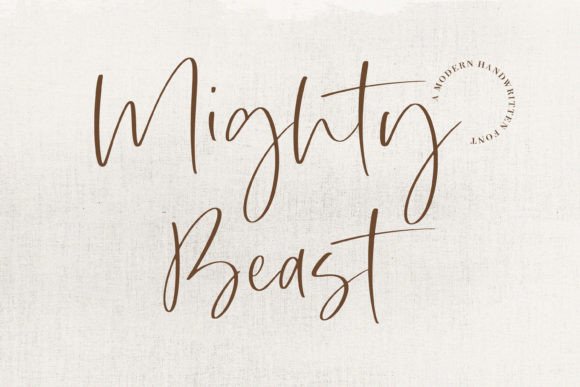
Mighty Beast is a stylish and incredibly elegant script font—designed not just to look beautiful, but to function with intention in real-world creative and professional workflows. It’s not a decorative afterthought; it’s a deliberate typographic choice that carries tone, warmth, and authority in equal measure. Whether you’re finalizing a wedding invitation suite, refining a brand identity system, or crafting a heartfelt greeting card, Mighty Beast delivers consistent visual impact without sacrificing legibility or personality.
Where Mighty Beast Fits in the Design Process
Fonts aren’t selected in isolation—they’re chosen at specific inflection points in a project’s lifecycle. Mighty Beast typically enters the workflow during the *refinement phase*: after layout structure is established, color palettes are locked, and messaging is finalized. That timing matters. Introducing it too early can distract from structural decisions; too late risks inconsistent application across deliverables.
For example, a freelance graphic designer building a boutique bakery’s rebrand might sketch logo concepts in neutral sans-serifs first—focusing purely on shape, balance, and scalability. Once the core mark is approved, Mighty Beast becomes the natural candidate for the logotype’s wordmark or tagline. Its confident stroke contrast and rhythmic flow reinforce the brand’s handmade, artisanal positioning—without needing illustration or texture to do the heavy lifting.
Practical Use Cases Across Real Workflows
Mighty Beast excels where human connection and intentional craftsmanship matter most. Its strength lies not in versatility across every context—but in precision within the right ones:
- Wedding stationery: Used for names and dates on invitations, it signals formality and care. Pair it with a crisp serif (like Playfair Display) for body text to create hierarchy and readability.
- Business cards: When a solo entrepreneur or consultant wants to emphasize personal voice—not corporate uniformity—Mighty Beast on the name line grounds the design in authenticity.
- Digital greetings: In Canva or Figma templates for e-cards, Mighty Beast scales cleanly up to 72pt for hero headers, then drops gracefully to 24pt for short sentiment lines—no awkward thinning or blurring.
- Branded quote graphics: For educators or coaches sharing insights on Instagram or email newsletters, Mighty Beast adds emphasis without shouting. It invites pause—not distraction.
What makes these applications work isn’t just aesthetics—it’s how Mighty Beast interacts with other assets. It pairs reliably with high-contrast photography, minimalist layouts, and muted or earth-toned palettes. It resists competing with busy backgrounds because its letterforms carry inherent weight and presence.
Integration With Tools and Platforms
Mighty Beast is delivered as a standard OpenType (.otf) file—ensuring broad compatibility across industry-standard tools. In Adobe Creative Cloud apps, its ligatures and stylistic alternates activate automatically when OpenType features are enabled—giving access to refined connections between letters like “Th”, “Qu”, and “St” without manual kerning.
In web projects, embedding Mighty Beast via @font-face requires attention to file weight and fallbacks. At under 80KB for the full character set, it loads efficiently—but always define a graceful fallback (e.g., "Segoe Script", cursive) for legacy browsers or slow connections. For WordPress users, plugins like WP Google Fonts won’t support Mighty Beast directly (it’s not a Google Font), so self-hosting with a lightweight font loader is the cleanest path.
Notably, Mighty Beast performs well in collaborative environments. Unlike some script fonts that rely heavily on contextual alternates requiring manual activation, its default glyph set delivers strong results out of the box—reducing friction for team members who may not be typography specialists.
Workflow Tips for Consistent, Efficient Use
Adopting Mighty Beast isn’t about swapping one font for another—it’s about adjusting habits to honor its strengths:
- Limit usage to one primary role per document. If it’s handling names on an invitation, don’t also use it for RSVP instructions. Reserve it for moments where emotional resonance matters most.
- Test spacing rigorously. Its generous x-height and flowing baseline mean line-height should sit between 1.3–1.5x the font size—not the 1.0–1.2 often used with display serifs. Tighter leading causes letters to visually collide.
- Export vector assets carefully. When converting Mighty Beast text to outlines in Illustrator or Figma, double-check that curved terminals (like the tail of “y” or “g”) remain smooth. Some older export presets can introduce micro-jaggies.
- Organize variants thoughtfully. Mighty Beast includes both regular and alternate characters. Keep a master style guide document noting which alternates are approved for client-facing work—and which are reserved for internal mood boards only.
Long-Term Usability and Quality Control
A font’s longevity depends less on trendiness and more on how easily it sustains quality across iterations. Mighty Beast holds up over time because its design avoids extreme novelty—no forced swashes, no exaggerated flourishes that date quickly. That restraint makes it adaptable: a business card designed in 2022 still feels current in 2024 because the font prioritizes clarity over ornament.
For agencies or in-house design teams, consistency starts with asset management. Store Mighty Beast in a shared cloud folder with clear naming (MightyBeast-Regular.otf, MightyBeast-Alternates.otf) and include a README with licensing terms and usage notes. This prevents version drift—where one designer uses an outdated file missing critical glyphs—and ensures every output meets brand standards without rework.
Also consider accessibility. While Mighty Beast isn’t intended for long-form reading, ensure any supporting text (captions, disclaimers, contact details) uses a highly legible companion face. Never rely solely on Mighty Beast for information that must be parsed quickly or by users with low vision.
Preparing for Implementation
Before adding Mighty Beast to your toolkit, ask two practical questions:
- Does this project benefit from perceived human authorship? If the goal is trust, intimacy, or celebration—yes. If the priority is neutrality, speed, or technical precision—consider a different tool.
- Do I have control over final output conditions? Mighty Beast shines in print and high-DPI digital displays. Avoid using it in low-resolution contexts (like basic email clients or older kiosks) where anti-aliasing may blur fine strokes.
Once those checks pass, preparation is simple: install the font, test it in your primary editing environment, and run one quick cross-platform check—open a sample in both desktop and web-based tools to confirm rendering matches your expectations.
Final Thought: Typography as Workflow Discipline
Mighty Beast doesn’t simplify design—it clarifies intent. Choosing it signals a decision to prioritize expressiveness without compromising professionalism. It fits seamlessly into workflows where outcomes depend on emotional resonance as much as functional clarity: launching a service with warmth, honoring a milestone with dignity, or distinguishing a small business through unmistakable voice.
That’s why designers, marketers, educators, and entrepreneurs return to it—not as a trend, but as a reliable instrument. When applied with attention to context, compatibility, and consistency, Mighty Beast does more than decorate. It anchors meaning.