Weaver Birds
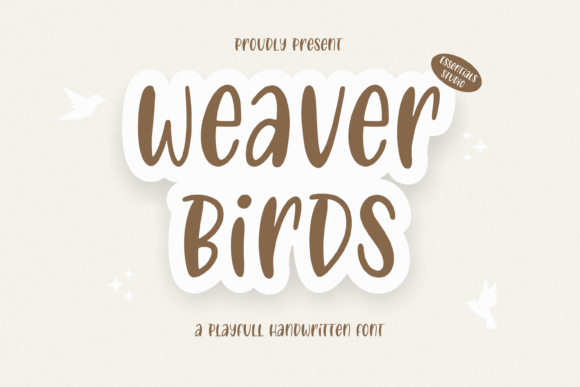
Weaver Birds is a playful handwritten font designed for clarity, warmth, and visual rhythm—not just decoration. It’s not a display typeface meant for fleeting impact, but a functional tool built to carry meaning with personality. Its uneven baseline, subtle ink variation, and connected letterforms mimic natural handwriting without sacrificing legibility at common sizes. That balance makes it especially useful in workflows where tone matters as much as information—product packaging that invites touch, wedding stationery that feels personal, social media visuals that stand out in fast-scrolling feeds, or branding assets that communicate approachability without sacrificing professionalism.
Where Weaver Birds Fits in the Creative Process
Weaver Birds rarely enters a project at the final stage. Instead, it integrates early—often during mood board development or brand voice refinement. When designers, marketers, or small business owners are defining how a product or service should *feel*, Weaver Birds becomes a tactile proxy for tone: friendly but not childish, intentional but not stiff, human but not sloppy. It’s used before mockups begin—not to lock in typography, but to test emotional resonance. A coffee roaster sketching packaging concepts might set their tagline in Weaver Birds alongside hand-drawn illustrations; a wedding planner drafting invitation copy might use it to gauge whether “forever begins here” reads as sincere or overly whimsical.
During execution, Weaver Birds supports consistency without rigidity. Because its letterforms have gentle variation—not mechanical uniformity—it adapts well to different substrates and output methods. It holds up on matte paper stock, translates clearly in digital ads at 24px and above, and avoids the “too-perfect” fatigue common with over-smooth script fonts. That reliability means less time reworking spacing or adjusting weight for legibility across formats. It doesn’t require heavy kerning overrides in most headline applications, nor does it demand extensive fallback planning for web use—especially when paired with a clean sans-serif like Inter or Lato for body text.
Practical Integration Across Platforms and Tools
Weaver Birds works best when treated as a *layered* asset—not a standalone solution. In Figma or Adobe Illustrator, it’s applied selectively: headlines, callouts, short quotes, or accent words within larger compositions. It’s rarely used for full paragraphs or data tables. That restraint preserves impact and ensures readability remains high where it counts most.
For web use, embedding Weaver Birds via @font-face is straightforward, but performance-aware implementation matters. Serve only the weights you need (typically Regular and Bold), subset characters if supporting limited languages, and always define system fallbacks. Pair it with a highly legible web-safe font for body copy—this isn’t about matching aesthetics, but maintaining hierarchy and accessibility. Screen readers don’t interpret font personality, but users do notice when contrast, line height, or spacing undermines Weaver Birds’ charm.
In print workflows, prepare files with outlined text for critical elements like logos or foil-stamped packaging details—this prevents substitution if the font isn’t embedded or licensed for vendor use. For editable templates (e.g., Canva brand kits or InDesign master pages), keep Weaver Birds live—but include clear usage notes: “Use only for headlines under 36pt,” “Avoid all-caps,” “Never stretch or skew.” These constraints aren’t limitations—they’re quality control measures that protect both brand integrity and reader experience.
Real-World Use Cases and Workflow Adjustments
- Product Packaging: Apply Weaver Birds to flavor names (“Honey Lavender,” “Smoked Sea Salt”) rather than nutritional panels. Its warmth reinforces artisanal positioning while remaining scannable on shelf. Test print samples under store lighting—some ink-on-kraft combinations mute its subtlety, so adjust contrast or size accordingly.
- Social Media Graphics: Use it for quote overlays on lifestyle photos—not captions in the feed itself. Instagram’s native font defaults are optimized for speed and accessibility; Weaver Birds shines in static visuals shared to Stories or Reels thumbnails, where tone and memorability drive engagement.
- Wedding Stationery: Reserve it for guest names on envelopes or ceremony programs—not legal disclaimers or parking instructions. Its informality builds intimacy, but shouldn’t compromise clarity where logistics matter.
- Branding for Educators or Coaches: Pair Weaver Birds with a structured grid and ample white space. The contrast between organic letterforms and disciplined layout signals both empathy and expertise—a balance many service-based professionals seek.
Compatibility and Long-Term Usability
Weaver Birds isn’t built for every context—and recognizing its boundaries is part of using it effectively. It doesn’t replace system fonts in dashboards, internal documents, or forms requiring rapid scanning. It also doesn’t scale well into ultra-narrow widths (e.g., mobile app buttons) or extremely large displays (billboards) without careful testing. Its strength lies in mid-range applications: 18–60pt print, 24–48px digital, and compositions where human connection is the goal.
Licensing is practical but requires attention. Most standard desktop licenses cover client deliverables like PDFs or packaged design files—but extended licenses are needed for SaaS platforms, merchandise resale, or embedded apps. Freelancers and agencies should verify license scope before including Weaver Birds in brand guidelines or template libraries. A mismatch here doesn’t break workflow immediately, but it can trigger compliance reviews later—slowing down launches or requiring last-minute font swaps.
Long-term, Weaver Birds supports consistency when paired with clear documentation. Include it in your brand’s typography hierarchy chart with usage examples, size ranges, and prohibited contexts. Store variable font files (if available) alongside static OTFs for maximum flexibility. Archive version numbers—font updates occasionally refine spacing or add glyphs, and knowing which iteration was used in a launched campaign helps maintain continuity across refreshes.
Getting Started Without Overcomplicating
You don’t need a full brand audit to begin using Weaver Birds meaningfully. Start small: pick one recurring asset—email headers, Instagram story templates, or product label accents—and apply it there for two weeks. Observe how it affects perception: Do customers comment on the “handmade feel”? Does your team default to it for warm messaging? Does it slow down production due to manual adjustments?
If the answer to the last question is yes, revisit your setup. Are you using OpenType features like contextual alternates? Are you applying consistent tracking values? Is your design system missing spacing presets for this font? Small technical refinements often resolve workflow friction faster than switching fonts altogether.
Finally, treat Weaver Birds as a collaborator—not a shortcut. It won’t compensate for vague messaging or inconsistent visuals. But when aligned with clear intent, thoughtful hierarchy, and audience awareness, it strengthens communication by adding texture, warmth, and intentionality—without demanding extra explanation or effort from the viewer.