Haghisty: A Magical Handwritten Font
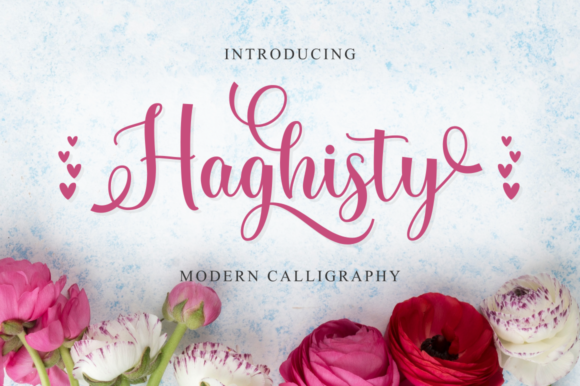
If you’ve ever scrolled through design resources and paused at a font that feels like it was written by hand—fluid, expressive, and full of personality—you’ve likely encountered something like Haghisty. It’s not just another script font. It’s a carefully crafted handwritten typeface with soul: smooth lines, organic movement, and subtle surprises in every letter.
What makes Haghisty special isn’t just how it looks—it’s how it works. Built with PUA (Private Use Area) encoding, it gives you direct access to all its alternate glyphs, swashes, and decorative flourishes without needing special software tricks or complex OpenType features. That means even if you’re new to typography, you can open it in Photoshop, Canva, Illustrator, or even PowerPoint—and start using elegant alternates right away.
Why Designers and Creators Choose Haghisty
Haghisty bridges the gap between authenticity and polish. Its varying baseline mimics natural handwriting—letters rise and fall like real pen strokes—so your text never feels stiff or robotic. At the same time, every curve is refined. No shaky edges, no unintended inconsistencies. Just graceful, confident letterforms that hold up beautifully at any size.
That balance is why people reach for Haghisty when they want warmth without sacrificing professionalism. A wedding invitation feels personal but timeless. A small business logo gains charm without looking childish. A blog header invites readers in—not just with words, but with tone and texture.
Real-Life Uses You’ll Recognize
Here’s where Haghisty shines in everyday creative work:
- Branding for small businesses: A local café, handmade soap shop, or yoga studio can use Haghisty in their logo or menu to communicate care, craft, and calm—without overdesigning.
- Social media graphics: Instagram story quotes, Pinterest pins, or Facebook event banners gain instant visual appeal. Try pairing Haghisty headlines with clean sans-serif body text for contrast that reads well on mobile.
- Printed materials: Wedding stationery, greeting cards, or workshop handouts benefit from its human rhythm. It’s legible enough for short phrases, yet distinctive enough to become a signature detail.
- Digital learning tools: Educators building online courses or printable worksheets sometimes use Haghisty for titles or motivational quotes—adding approachability to academic content.
- Personal projects: Journal covers, framed quotes, or custom gift tags become more meaningful when the lettering feels intentional and hand-crafted.
You don’t need advanced design skills to get started. In fact, many users begin by simply replacing a default heading font with Haghisty—and instantly noticing how much more inviting their layout feels.
What Makes Haghisty Stand Out Technically (Without the Jargon)
PUA encoding is the quiet hero here. Think of it like having every special character already labeled and ready to use—no hunting through glyph panels or memorizing keyboard shortcuts. If your design app supports PUA (most do), you’ll find swashes tucked neatly beside standard letters, alternates grouped logically, and even ligatures accessible with simple copy-paste or font-switching workflows.
The “varying baseline” is another practical strength. Unlike rigid scripts that line up like soldiers, Haghisty’s letters shift subtly—some sit higher, some lower—just like real handwriting. This creates gentle visual rhythm, helping your eye flow naturally across a phrase instead of stopping at each word.
And because it includes so many gorgeous alternates—different ‘a’ shapes, looping ‘g’s, extended ‘t’ crossbars—you can fine-tune how a word feels. Want something playful? Swap in a bouncy alternate. Going for elegance? Choose a slender, tapered version. It’s like having a set of expressive tools built into one font file.
Things to Keep in Mind Before You Use Haghisty
Like any tool, Haghisty works best when matched to the right job. Here are a few grounded observations:
- It’s designed for impact—not long paragraphs. Haghisty excels in headings, quotes, logos, and short labels. For body text or dense content, pair it with a clear, readable font like Lato, Inter, or Georgia.
- Test readability early. Swashes and flourishes add beauty, but they can reduce clarity at small sizes or on low-resolution screens. Preview your design on a phone before finalizing.
- Licensing matters. Haghisty is typically sold for personal and commercial use—but always check the license terms. Some versions allow unlimited projects; others may restrict use in templates or SaaS platforms.
- Not all apps display PUA characters the same way. While most modern tools handle it smoothly, older versions of Word or basic web builders might show blank boxes or fallback fonts. When in doubt, test with a few key alternates first.
- It pairs beautifully with restraint. Haghisty doesn’t need extra effects—no drop shadows, heavy outlines, or gradients required. Let its natural flow and contrast do the work.
Many beginners worry about “getting it right.” But with Haghisty, there’s room for intuition. Try writing a single phrase three ways: once with standard letters, once with swashed capitals, once with a mix of alternates. See which version matches the feeling you want to convey. That kind of hands-on exploration is how confidence grows—and how great designs begin.
A Font That Grows With You
Whether you're sketching a logo idea on paper, designing a Canva template for clients, or adding a finishing touch to a printed flyer, Haghisty adapts. It’s versatile—not because it tries to be everything, but because its craftsmanship supports many intentions: celebration, calm, creativity, connection.
Its magic isn’t in complexity—it’s in clarity. Every curve has purpose. Every alternate serves expression. And every use starts with a simple question: What feeling do I want this text to carry? With Haghisty, the answer often comes before you even type the first letter.