Marcella: Elegant Handwritten Font for Real Design Work
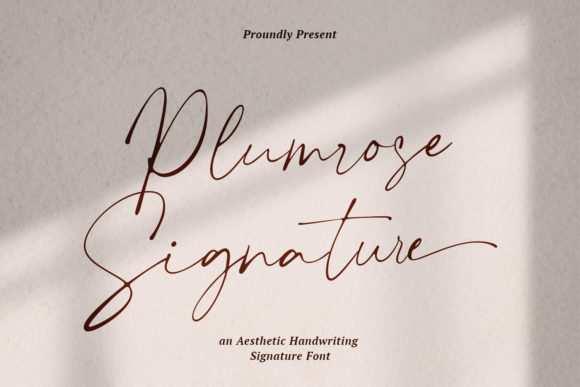
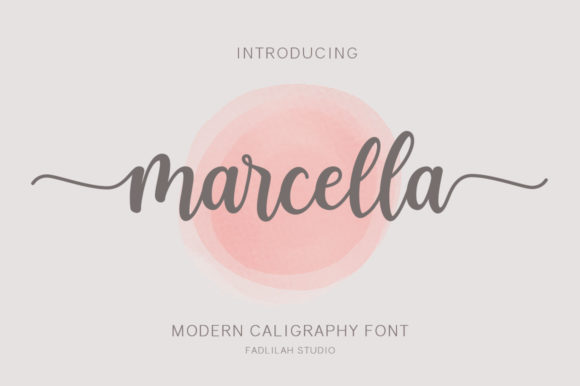
Marcella isn’t just another script font—it’s a versatile, expressive tool built for designers and creators who need authenticity without sacrificing polish. With its smooth, confident lines and thoughtfully varied baseline, Marcella feels equally charming and elegant. It doesn’t shout; it invites. That quiet confidence is why it works so well across real-world projects—from wedding stationery to small business branding—where tone, clarity, and intention matter.
What Makes Marcella Stand Out
At its core, Marcella is a PUA-encoded handwritten typeface. That technical detail matters: it means every alternate glyph, swash, and stylistic flourish is accessible directly in design apps like Adobe Illustrator, Photoshop, or Affinity Designer—no workarounds, no missing characters. You don’t need special software or coding knowledge to unlock its full potential.
The varying baseline adds organic rhythm—subtle, but noticeable when you step back. It avoids the robotic uniformity of many script fonts while staying legible and refined. Combine that with gorgeous standard glyphs, rich alternates (including beginning- and end-of-word flourishes), and carefully balanced spacing, and you get a font that feels hand-drawn but performs like a professional tool.
Where Marcella Fits Naturally
Think beyond “just for weddings.” While Marcella looks stunning on wedding invitations and thank-you cards, its strength lies in adaptability. Here’s how different users apply it meaningfully:
- Small business owners use Marcella for boutique packaging labels, café chalkboard menus, or artisan product tags—adding warmth without looking overly casual.
- Educators and course creators incorporate it into slide headers, workbook covers, or printable reflection prompts—softening academic tone while keeping content approachable.
- Bloggers and content creators deploy Marcella selectively: as a logo lockup, in Instagram quote graphics, or as a signature element in email newsletters—always paired with a clean sans-serif for contrast and readability.
- Freelance designers build brand systems around Marcella by pairing it with neutral supporting fonts (like Inter or Lora) and defining clear usage rules—e.g., “Marcella only for headlines and signatures; body copy stays in a highly legible serif.”
Practical Tips for Stronger Results
Using Marcella well isn’t about applying it everywhere—it’s about using it intentionally. Here are grounded recommendations based on real design practice:
- Limit its role: Reserve Marcella for moments that benefit from personality—logos, quotes, section dividers, or short callouts. Avoid long paragraphs or dense text blocks; its beauty lives in brevity.
- Pair deliberately: Contrast is key. Pair Marcella with a crisp, low-contrast sans-serif (e.g., Montserrat, Poppins) or a sturdy serif (e.g., Merriweather, Source Serif). This keeps hierarchy clear and prevents visual fatigue.
- Test at scale: A flourish that looks graceful at 48pt may clutter at 14pt. Preview your design at actual size—on screen and in print—and adjust spacing or glyph choice accordingly.
- Maintain consistency: If you’re using Marcella for a client’s brand, document which alternates are approved (e.g., “Only use swash ‘t’ in logos, not in body text”) and share those guidelines with anyone else touching the files.
Ideas You Can Use Today
You don’t need a big project to explore Marcella’s value. Try one of these low-lift, high-impact applications:
- Create a set of printable quote cards for your classroom or studio—each featuring a short, meaningful line in Marcella, centered over a muted background. Print on textured paper for tactile appeal.
- Redesign your email signature: use Marcella for your name only, followed by your title and contact info in a simple sans-serif. Instantly more personable—and still professional.
- Design a mini greeting card series for seasonal moments (a “thank you” for clients, a “congrats” for milestones, a “thinking of you” for quiet check-ins). Keep layout minimal—Marcella does the emotional heavy lifting.
- Use Marcella in social media stories to highlight a single sentence from your latest blog post or podcast episode. The script draws attention; the message stays central.
For Creators Who Value Craft Over Trend
Marcella appeals to people who care about how something feels—not just how it looks. It’s not flashy, and it’s not trying to be. Its elegance comes from restraint and precision: the slight tilt of a crossbar, the gentle curve of an ‘s’, the way certain letters connect without overlapping awkwardly. That kind of nuance takes time to design—and it shows up in how audiences respond.
If you’ve ever hesitated to use a script font because it felt too fragile, too ornate, or too hard to control—Marcella bridges that gap. It gives you expressive range without sacrificing usability. And because it’s PUA encoded, you’re never guessing where a swash lives or whether a ligature will render correctly.
Getting Started Thoughtfully
Before installing Marcella, ask yourself two questions: What feeling do I want this piece to carry? Where will people see it—and what do they need to understand quickly?
Answering those helps you decide where Marcella adds value—and where it might distract. For example: a restaurant menu benefits from Marcella in the header (“The Garden Table”) but needs clear, scannable typography for dish names and prices. A nonprofit’s annual report might use Marcella only in the cover title and donor thank-you page—keeping the rest functional and inclusive.
Also consider accessibility. While Marcella itself isn’t intended for body text, always ensure supporting fonts meet contrast and sizing standards—especially for digital use. Pairing Marcella with a WCAG-compliant sans-serif ensures your design speaks to both heart and practical need.
Final Thought: Tools Serve Intent
Fonts like Marcella don’t create meaning—they clarify it. When you choose Marcella, you’re choosing warmth, intention, and human rhythm over sterile uniformity. But its impact multiplies when matched with thoughtful structure: smart hierarchy, consistent spacing, purposeful pairing, and respect for your audience’s time and attention.
So go ahead—install it, test a few alternates, try it on a real project. Then refine. Because the best creative work isn’t about finding the perfect tool. It’s about using the right one, well.